Clarity
Understanding student readiness.
- 01Students were unsure which skills industry roles required.
- 05Colleges needed better visibility into student readiness.
Design direction. An integrated assessment that shows where a student starts.
 SMARTX TECHNOLOGIES / PRODUCT DESIGN
Helped shape and launch a career-readiness platform connecting students with practical learning, mentorship and internship opportunities.
Contributed to building and launching the core student internship and mentorship experience.
Translated student and employer needs into a product experience designed to improve career readiness, engagement and talent matching.
Case study · Internship and career-readiness platform
Turning potential into progress.
Reimagining internship discovery as a personalised career development journey, connecting students with practical projects, structured learning and mentorship.
My contribution: end-to-end experience design for the student journey, from discovery and research to interaction design and interface delivery.
01 · Project overview
Aptpath was designed to address challenges on both sides of the journey from education to employment.
Selected interface visuals have been reconstructed for this case study based on the original design work.
Students struggled to
Employers struggled to
The broader vision
02 · Research and discovery
Research covered the people who shape a student's path, from the student to the institutions and companies around them.
Stakeholder ecosystem. A conceptual map of the groups research included.
Interviews I conducted personally.
Questionnaires distributed through Google Forms.
Informal discussions with SmartX leadership.
A review of adjacent internship and career-development platforms.
Participant counts, questionnaire totals and exact dates are not reported here.
03 · Research findings
Retrospective, qualitative findings from interviews, questionnaires and stakeholder discussions. Worded from recollection, not as verbatim quotations or measured evidence.
Understanding student readiness.
Design direction. An integrated assessment that shows where a student starts.
Building practical, demonstrable skills.
Design direction. A personalized learning pathway, projects, mentorship and progress cues.
Connecting student capabilities with relevant industry needs.
Design direction. Profiles and assessment results that give employers readable evidence.
04 · Market and competitor research
I explored adjacent internship and career-development platforms, including Internshala and other services whose names I no longer remember.
Market landscape. Conceptual. Adjacent offerings are grouped by area, not ranked.
Strategic takeaway
I did not identify a directly comparable platform that combined the complete experience Aptpath envisioned.
05 · The pivotal design discovery
The first concept centred on internship discovery. Testing showed students needed to understand themselves first.
The initial Aptpath concept was primarily an internship discovery and matching experience. Its simplified first flow was:
Registration → Internship discovery → Find a suitable match
I created the information architecture, user flows, wireframes and interactive prototypes for this concept.
Observed in walkthroughs and usability testing
I also reviewed click activity and navigation behaviour from an early demo product.
Key insight
Key design decision
Before
Revised direction
Simplified reconstruction of the design evolution. Not a verbatim record of the original flows.
06 · UX strategy and information architecture
I designed the information architecture, navigation, user flows and initial wireframes before moving into high-fidelity UI.

Registration and profile
Registration starts the profile that later stages build on, so the assessment and learning path have something to work from.
Simplified dashboard
I simplified the dashboard to reduce navigation complexity. The aim was to make the next step explicit, so students could see where to go without searching.
Name and email, with the email shown as verified.
College, course and year of study, with an optional graduation year.
Background helps assign relevant projects and mentors, not a one-size-fits-all plan.
Continue to assessment is the single primary action on the page.
Student journey
Core student journey
ShippedPart of the integrated assessment
Designed, not launchedDesigned as a starting point
Designed, not launchedLevel status unknown
Status unknownPathway status unknown
Status unknownMentorship launched; projects not confirmed
Launched in partUpdated experience launched in part
Launched in partCore internship experience
ShippedStatus reflects what I can confirm. "Designed" means designed but not launched.
07 · Key design decisions
Each iteration lists its intended benefit. None is presented as a measured improvement.

Iteration 01
Reduced navigation complexity and made the experience easier to understand.
Fewer routes to choose from, and a clearer next step.
Launched in part

Iteration 02
Introduced visual progress cues to help students understand their journey and next steps.
A clearer sense of where a student is within the journey.
Status unknown

Iteration 03
Designed an integrated psychometric and skill assessment to establish a starting point for more relevant learning and mentorship.
A starting point that shapes learning and mentorship from the outset.
Designed, not launched
Iteration 04
Designed streaks, achievements, leaderboards and progression to motivate students to return and continue learning.
A reason to return and keep learning, once the core journey is established.
Designed, not launched
08 · Assessment experience
The integrated psychometric and skill assessment combined two strands into one result. It was designed, but not launched.
The answered count and progress bar show how far the student has come.
A five-point agreement scale, within the same assessment.
Practical scenario questions sit in the same assessment, not in a separate test.
The chosen option is shown clearly, with a Selected state.
The final action, available once every question is answered.

Share your perspective, apply your skills, then get a pathway that fits.
One clear entry point, with a note that students can go at their own pace.
Shows the four learning levels and how the outcome connects to next steps.
Suitable projects and mentors follow the assessment result.
The result places the student at one starting level.
What the level leads to: guided projects and mentors matched to assignments.
All four levels are shown, with the assigned level highlighted.
A plain-language readout of strengths, rather than scoring logic.
Integrated assessment, then level, then relevant projects and mentors.
The assessment result determined the starting level: Progressor, Shaper, Visionary or Maverick.
09 · Personalized learning pathway
Learning levels were designed to place each student at a starting point and guide the pathway from there. Their launch status is unknown.

Integrated assessment, then Shaper, then matched projects and mentors.
Each project is linked to the level with a short rationale.
Each project has a named mentor, whose support is tied to that project.
The page leads into the student dashboard.
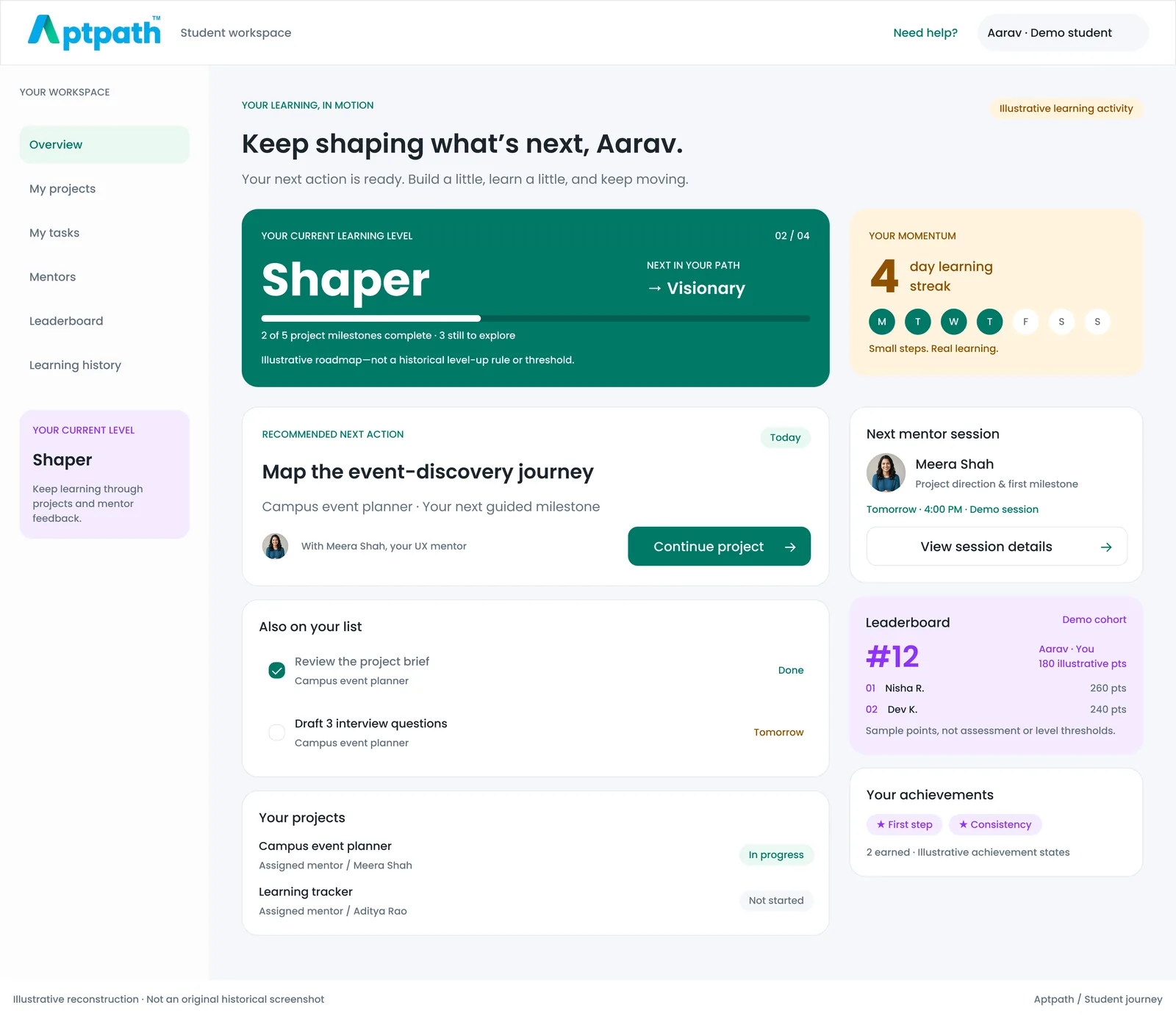
10 · Student dashboard and progress
The dashboard brings together learning activities, projects, mentor sessions, streaks, achievements and progression. Each element is marked with its launch status.
The level, progress through the path, and the next level in view.
A weekly learning streak, shown as daily markers.
One next task, with the assigned mentor shown alongside it.
Time and session focus, with one action to view details.
Rank within the demo cohort. Points are sample values, not assessment results.
Earned achievements, shown as states.
Status not confirmed for activities and project assignments. Mentor sessions follow the launched mentorship experience.
11 · Usability testing and iteration
Prototype walkthroughs and usability testing were where the direction changed. Testing an early demo product added navigation and click observations.
The working loop. Conceptual.
Featured story: from post-registration confusion to an assessment-led journey
Students were unsure which internships were right for them, and many dropped off.
In walkthroughs, students were confused about navigation, revisited sections and did not complete the intended journey.
Students needed to understand their abilities and development needs before choosing opportunities.
An assessment-led journey: integrated assessment, starting level, personalized learning, then relevant opportunities.
Testing informed
12 · The connected ecosystem
Aptpath was intended to support students, employers, mentors and colleges. This is a conceptual reconstruction of how student development could produce information for the other groups.
Conceptual reconstruction. No employer or college dashboards are shown.
Students
Build profiles, understand capabilities, develop skills, complete projects and receive mentorship.
ShippedEmployers
Envisioned: verified profiles, assessment results, learning levels, completed projects, practical performance and matching against company requirements.
Envisioned, not launchedColleges
Envisioned: visibility into student readiness and progress.
Envisioned, not launched13 · Implementation status and outcome
The product vision was not fully launched. This section separates what shipped from what was designed or envisioned, and marks unknown statuses.
An updated student experience was launched and tested in part.
What this work contributed
No retention, hiring, conversion, engagement or placement results are claimed.
14 · Reflections
Four lessons about designing for readiness, not only for task completion.
Testing the first flow exposed an assumption the concept had been built on. I would prioritise that kind of validation even earlier, before wireframes are polished.
Finishing registration is not the same as being ready to choose. Putting understanding ahead of choice changed the structure of the whole journey.
Not every part of the vision launched. Separating shipped, designed and envisioned work kept the case study honest and the design direction usable.
Students, mentors, employers and colleges rely on the same information. Designing for one group meant considering what it signalled to the others.